April, 2026
While the Lumu Portal provides real-time visibility into your network’s health, communicating that health to the Board of Directors often requires a different lens. To help CISOs and IT Leaders move from detecting threats to measuring maturity, we are excited to launch the official Lumu Power BI Template.
The Lumu Power BI Template isn’t just an integration, it’s a reporting shortcut. It allows you to feed Lumu Defender data directly into Microsoft Power BI, transforming complex adversary signals into a professional-grade Executive SecOps Summary in minutes.
What’s New
This ready-to-use template allows you to feed Lumu Defender data directly into Microsoft Power BI. Instead of manual exports or complex API scripting, you can now deploy a professional-grade security dashboard in minutes.
Key Features for Strategic Leadership
- Board-Ready Executive Summaries: High-level summaries of confirmed compromises, how many incidents were closed or muted, and threat types.
- Quantifiable ROI & Cost Savings: The template automatically calculates operational impact, showcasing exactly how many hours your team has saved through automation and the specific dollar amount of operational cost savings.
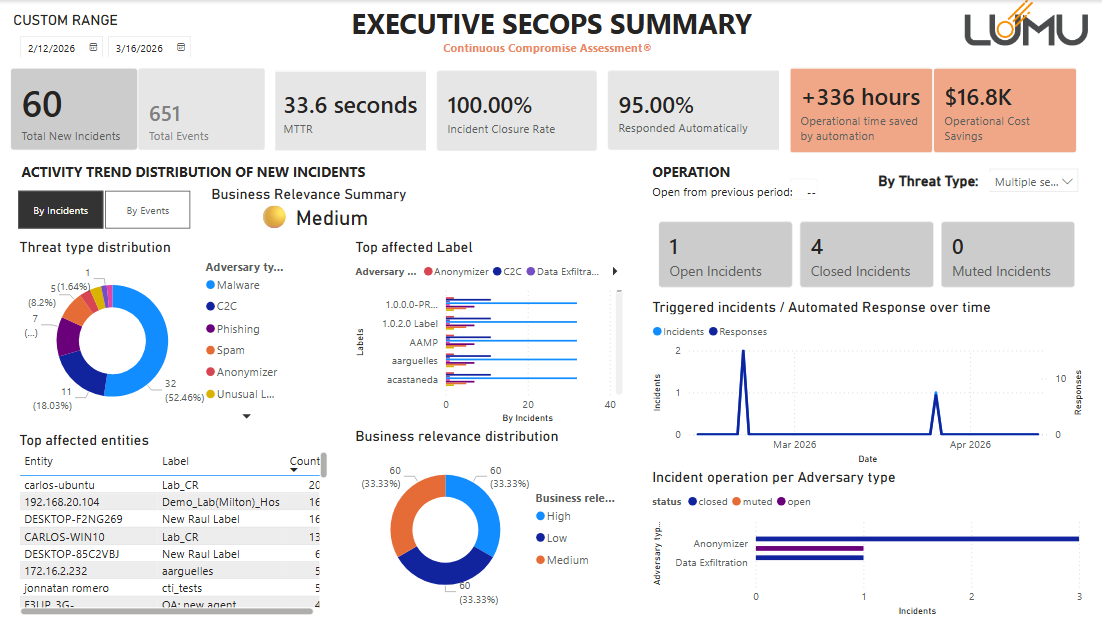
- Maturity Benchmarking: Track your Mean Time to Respond (MTTR) and Incident Closure Rates over time. These are the primary KPIs that prove your security program is maturing and becoming more resilient.
- Asset-Level Risk Distribution: Drill down into specific labels, groups, or endpoints that are most frequently targeted. This helps justify resource allocation to the areas of the business that are most frequently targeted.
- Seamless Integration: Uses the Lumu Defender API to ensure your reports stay updated automatically.
To get started, visit the Integrations section in the Lumu Portal, copy your API key, and follow our step-by-step setup guide.