June, 2026
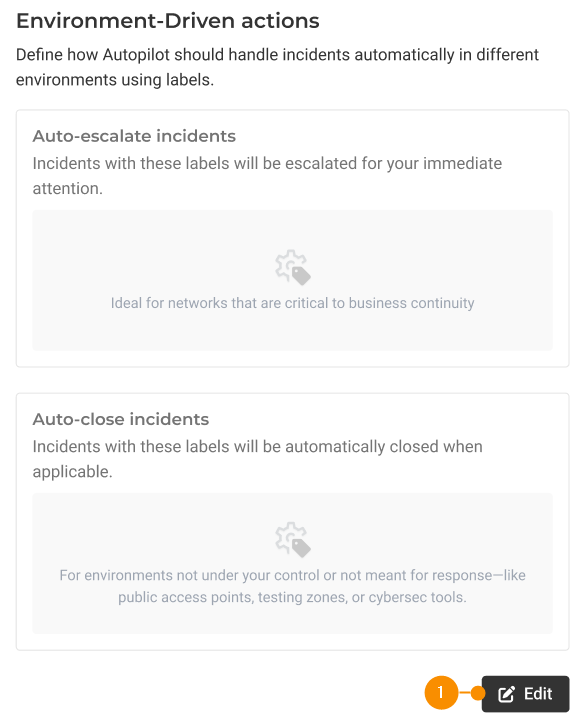
Autopilot allows you to automatically manage incident lifecycles across different environments by using labels. By tagging specific environments (such as critical corporate networks, branch offices, or testing labs) you can instruct Autopilot to handle incidents instantly based on their context:
- Auto-escalate critical environments: Assign labels to vital assets so any associated incidents are immediately escalated for human review.
- Auto-close low-priority or unmonitored environments: Assign labels to testing zones or public access points so routine alerts close automatically without draining analyst time.
Example: If an incident occurs on a network labeled Corporate HQ (Critical), Autopilot is instructed to immediately escalate it for your team’s attention. Conversely, if an incident pops up on a network labeled Guest Wi-Fi (Testing), Autopilot automatically closes it.
Automate Triage Across Your Environments
Environment-Driven Actions empower security teams to define label-based policies that govern how incidents progress through the resolution pipeline.
Key capabilities include:
- Label-Driven Lifecycle Management: Automatically auto-close or auto-escalate incidents based on labels assigned to affected assets or threats.
- Response-Gated Auto-Closure: Add an extra layer of validation by enabling the “Only if automatically responded” condition. When selected for a given label, incidents will only close if Lumu Defender has already executed an automated response action, preventing unmitigated threats from closing prematurely.
- Accelerated Incident Handling: Cut down Mean Time to Respond (MTTR) and Mean Time to Resolution by allowing Autopilot to handle routine lifecycle transitions while your analysts focus on high-priority threats.
Get Started Today
Environment Driven Actions are now live for all Lumu Autopilot users. Log into the Lumu Portal today to access this functionality, or learn more about configuration in our documentation.