
- Reading Time: 10 mins
Table of Contents
Indicators of Compromise (IoCs) are a key concept in Cybersecurity. This guide explains what Indicators of Compromise are, shows you common examples, and details how to respond to IoCs effectively.
Indicators of Compromise (IoC) are digital evidence that a hacker has broken into your network. It’s like finding a muddy bootprint in a secure lab. This single clue proves someone was there who shouldn’t have been.
While a single clue might seem small, it’s a critical tripwire that kicks off a high-stakes hunt to find the intruder. Security teams must act fast to stop them before major damage, like data theft or a full shutdown, can occur.
Nearly every digital attack leaves these ‘bootprints’. These clues include suspicious IP addresses, malicious domains, strange file names, or odd entries in system logs.
For a security team, detecting and responding to these clues is the key to understanding an active attack. Teams also use IoCs and threat intelligence to bolster defenses against future attacks.
To do this well, you first need to know what you’re looking for.
The 6 Most Common Types of Indicators of Compromise
The most common types of IoCs in cybersecurity are grouped into categories, based on where they appear. Here are the six most common types plus examples of Indicators of Compromise for each one.
1. Network Indicators
These clues appear in your network traffic. A common sign is a sudden flood of data leaving your network — like thieves hauling out your digital filing cabinets. Other red flags include communications with known malicious websites or strange DNS.
Examples of Indicators of Compromise on the Network
| Example Network IoCs | Description |
|---|---|
|
Unusual Outbound Network Traffic |
A sudden spike in data leaving your network could indicate that an attacker is exfiltrating data. |
|
Anomalous DNS Requests |
Attackers often use the Domain Name System (DNS) for command and control (C2) communication. |
2. Host-Based Indicators
These are the ‘bootprints’ found on individual devices like laptops and servers. Look for strange changes, such as new software you didn’t install or your security software being suddenly turned off.
Examples of Indicators of Compromise on a Host
| Example Host-based IoCs | Description |
|---|---|
|
Unusual Account Activity |
Including logins at odd hours or from unusual locations or multiple failed login attempts. |
|
Unexpected Software Installations |
Software that appears on a system without a known, legitimate installation process. |
3. File-Based Indicators
These clues relate to malicious files. A classic example is a file named invoice.pdf.exe — a program disguised as a harmless document. Finding files associated with known malware is another key indicator.
Examples of Indicators of Compromise in a File
| Example File-Based IoCs | Description |
|---|---|
|
Suspicious File Names or Locations |
Malicious files may have common system file names to blend in or be in unusual directories to avoid detection. |
|
File Hashes of Known Malware |
Security researchers identify and catalog the unique cryptographic hashes (like MD5 or SHA-256) of malicious files. |
4. Behavioral Indicators
An attacker’s actions can give them away. This includes a storm of failed login attempts on one account. Or it might be a login from an impossible location, like an employee from Ohio signing in from another continent.
Examples of Indicators of Compromise From Behavior
| Example Behavioral IoCs | Description |
|---|---|
|
Increased Database Read Volume |
A sudden increase in the volume of data being read from a database could suggest an attempt to steal large amounts of information. |
|
Large Number of Requests for the Same File |
Multiple, rapid requests for a single file might indicate an attempt to exfiltrate it. |
5. Metadata Indicators
The data about your files can also be a clue. Attackers may change a file’s creation date or author details to cover their tracks.
Examples of Indicators of Compromise in the Metadata
| Example Metadata IoC | Description |
|---|---|
|
Suspicious File Metadata |
Changes to file creation or modification timestamps that don’t align with normal user activity. |
|
Anomalous Geolocation Data |
A user account suddenly shows activity from a country where your organization has no presence. |
6. Email Indicators
Email attacks are a rich source of IoCs. Look for suspicious sender addresses, urgent subject lines, and attachments with dangerous file types, like .exe.
Examples of Indicators of Compromise in Emails
| Example Email IoC | Description |
|---|---|
|
Suspicious Attachments |
Unsolicited emails with attachments, especially those with file types like .js. .exe, .zip, or .scr. |
|
Emails from Lookalike Domains |
Attackers often register domains that are very similar to legitimate ones to trick users. |
Recognizing these IoCs is the first step — but finding a clue is not enough without a plan of action. The moment an IoC is confirmed, you must have a plan to act quickly to limit the damage.
Your First 3 Steps After Finding an Indicator of Compromise
Finding that muddy bootprint means you are in a race against time. A fast, planned response is everything. While every organization’s incident response plan differs, the main goals are always the same:
What to Do After Finding an IoC

Contain the Threat
Isolate affected devices from the rest of the network to stop the intruder from moving around and causing more damage.

Eradicate the Adversary
Once contained, hunt down and remove every trace of the malware. Kick the intruder out and make sure the threat is gone for good.

Learn the Lesson
After the danger is past, figure out how the attacker got in and fix that weakness. This turns a bad incident into a powerful lesson that makes your defenses stronger.
The best defense, however, isn’t based solely on past incidents — it prepares for threats before they even arrive.
How Threat Intelligence Can Help You Build a Fortress
The smartest defense isn’t just about responding to a data breach — it’s about preparing for an attack before it ever launches. Using threat intelligence feeds, packed with fresh IoCs, is the key to this strategy.
Sharpen Your Game Plan
Use threat intelligence like a detective’s daily crime briefing. It shows you the tools, techniques, and targets that criminals are using. This knowledge helps you build a smarter response plan.
Fuel the Proactive Hunt
Threat hunters act like police on patrol. Armed with lists of known IoCs from global intelligence, they search their networks for hidden intruders before a crisis starts, instead of just waiting for an alarm.
Build an Automated Defense
A confirmed IoC becomes a Wanted poster for your security tools. Firewalls and other tools get the attacker’s signature and automatically block it on sight. This helps protect your network from that threat in the future.
This proactive, intelligence-driven approach can fuel both human security teams and a variety of tools. Putting these powerful strategies into practice requires the right set of modern security tools.
How To Detect and Respond to Indicators of Compromise
No single tool is a silver bullet for finding Indicators of Compromise. The best defense uses a layered set of tools — each has strengths and weaknesses. Understanding them is key to building a strong security posture.
Security Information and Event Management (SIEM)
Think of a SIEM as a vast digital library that collects logs from your entire network.
- How this tool uses IoCs: You feed a SIEM a list of known IoCs (like bad IP addresses). It then searches through all its logs for a match. If it finds one, it creates an alert.
- Strength: Sheer scope — it has the potential to see any incident
- Weakness: It’s extremely noisy. Finding one real clue in billions of logs is a huge task that leads to alert fatigue. Integrating your SIEM with a threat intelligence source like Lumu Maltiverse is essential to improve the quality of alerts.
Endpoint Detection and Response (EDR)
EDR is like a bodyguard assigned to each of your devices, such as laptops and servers.
- How this tool uses IoCs: It can block a malicious file instantly if its IoC (like a file hash) is known.
- Strength: It has deep visibility into what happens on a single machine.
- Weakness: It's blind to network traffic between devices and can’t protect equipment that doesn’t run an agent, like IoT cameras. Also threat actors are becoming more and more adept at getting past EDRs.
eXtended Detection and Response (XDR)
XDR gives your security tools ‘walkie-talkies’ to talk to each other, connecting data from endpoints, email, and more.
- How this tool uses IoCs: When an IoC is found in one place (like an email), XDR automatically searches for it everywhere else (on endpoints, in network logs, etc.). This helps connect the dots of an attack.
- Strength: It creates a more unified picture of a potential threat.
- Weakness: Similar to EDRs, its view is still limited to its connected sources and can miss crucial network conversations that reveal the full attack.
Network Detection and Response (NDR)
An NDR is like a central surveillance system watching all traffic between all devices.
- How this tool uses IoCs: It watches all network conversations in real-time. It looks for any device on your network that is ‘talking’ to a known malicious IoC, like a hacker’s command-and-control server.
- Strength: It provides the ground truth of what’s really happening on your network. Solutions like Lumu Defender integrate with your other tools to find confirmed evidence of compromise, cutting through the noise from other tools.
Finding a threat is only half the battle. Responding to every alert can overwhelm any team. This is why automation is critical — a tool like Lumu Autopilot acts on confirmed threats automatically and 24/7. It can tell your firewall to block an IP or your EDR to isolate a device, closing the loop between detection and response without human delay.
Answering the Frequently Asked Questions About IoCs
Indicators of Compromise can seem complex, but understanding them is key to a strong defense. Here are clear, simple answers to the most common questions about them.
Where Do IoCs Come From?
IoCs are gathered from a global ecosystem of security sources. Your own security team might find them during an investigation, like a clue at a crime scene. They are also shared by the community through government agencies, like CISA, or industry-specific groups that collaborate on threats. Most often, they are sourced from professional threat intelligence feeds that track and distribute data on active global attacks.
Where Can I Find High-Quality, Up-To-Date IoC Lists?
While many free threat feeds exist, they are often noisy with old or irrelevant data. The real value comes from clean, verified intelligence. Platforms like Lumu Maltiverse are designed for this. They gather data from hundreds of sources and refine it to provide highly accurate IoC lists. This reduces false alarms and helps your team focus on real threats.
Are IoCs Becoming Obsolete?
No, but their role is evolving. A simple IoC is like a single snapshot in time — attackers can change them easily. The real power today is connecting these snapshots to see the full story of an attack. This is why modern tools like Lumu Defender use their data archive to continuously hunt through past network activity, using new intelligence to find compromises that were previously invisible.
How Are IoCs Different From TTPs?
If an IoC is the what, a TTP is the how. An IoC is the evidence left behind, like a specific weapon an attacker used. TTPs (Tactics, Techniques, and Procedures) describe the attacker’s playbook.
If IoCs identify the tool, TTPs explain the behavior and methods behind it. For example:
- IoC: A malicious file, named update.exe is run on a computer.
- TTP: The attacker used a spearphishing email (Technique) to achieve Initial Access (Tactic) by tricking an employee into running that file.
A highly recommended resource for TTPs, used within Lumu, is MITRE ATT&CK.
How Does MITRE ATT&CK Relate to IoCs?
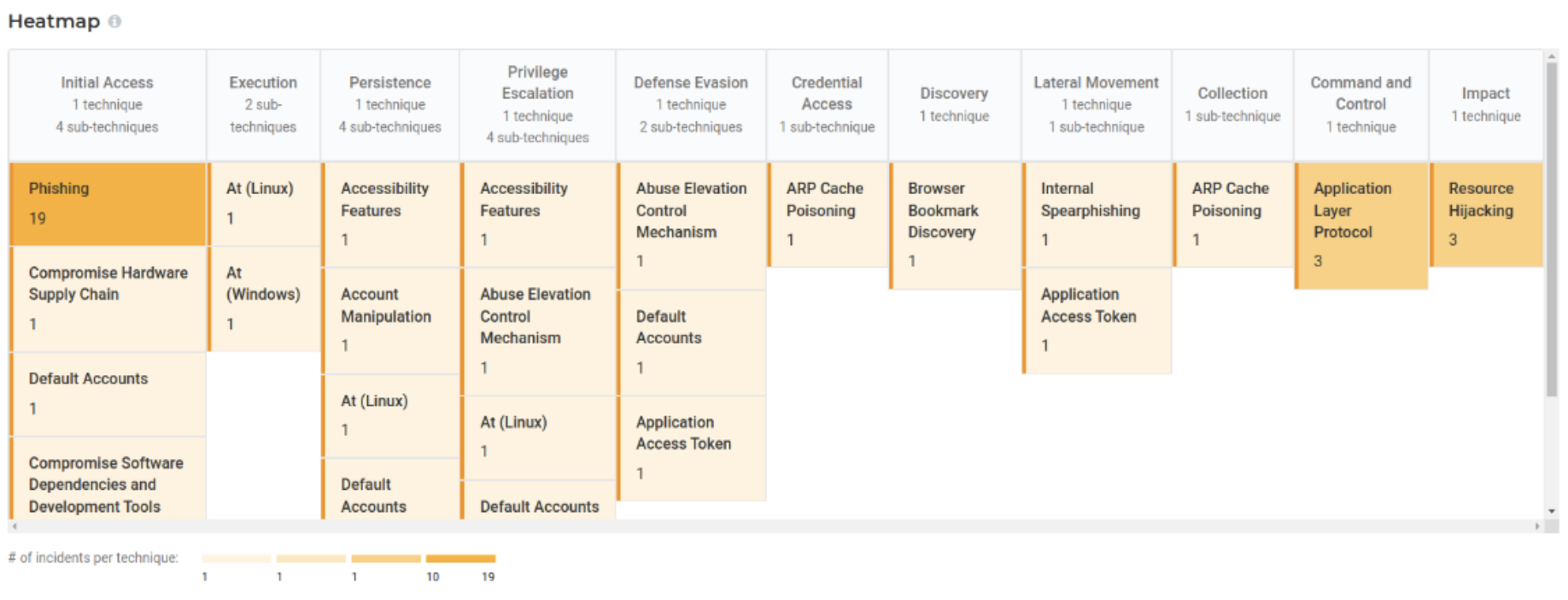
The MITRE ATT&CK® framework is like a global encyclopedia of hacker behavior. It lists and explains all the known tactics and techniques used in real-world attacks. This gives security teams a common language to understand an attack’s strategy, not just the clue they found.
Lumu’s ATT&CK Global Matrix maps detected IoCs directly to this framework. This gives you an instant visual heatmap of the adversary’s playbook within your network.
What’s the Difference Between Indicators of Compromise (IoCs) and Indicators of Attack (IoAs)?
This is all about timing. An IoC is evidence after an event, like the muddy bootprint in a secure room. An IoA is evidence of an attack in progress, like seeing someone pick the lock on the door. IoCs help you investigate the past, while IoAs help you stop an attack now.
A real-world IoA would be detecting a script actively trying to pull passwords from your computer’s memory, indicating an attacker is trying to steal credentials right now.
How Long Is an IoC Useful For?
The lifespan of an IoC varies dramatically. A malicious IP address may only be dangerous for a few hours before it’s taken down. A malware file hash is useful until the attacker alters the file slightly. A malicious domain name might only last a few months.
The key is to use a threat intelligence system that understands this lifecycle, prioritizing fresh, relevant IoCs and retiring old ones. This prevents your team from chasing ghosts and allows them to focus their expertise on neutralizing active threats.
Beyond the Bootprint: Why Optimizing Your Defense is Necessary
Understanding Indicators of Compromise is crucial — but manually chasing every clue leads to analyst burnout while stealthy threats slip through the cracks. The only way to win is to optimize your defense. This requires a fundamental shift from a reactive mindset to a proactive and automated one. It means high-quality intelligence and continuous assessment, not just endless alerts.
It isn’t about working harder, it’s about making your defense smarter and more efficient.
This modern approach is the foundation of the Lumu platform. Lumu combines the network visibility of Lumu Defender with the refined intelligence of Lumu Maltiverse to deliver confirmed threats and help you automate the response.
Ready to stop chasing alerts and start neutralizing threats?