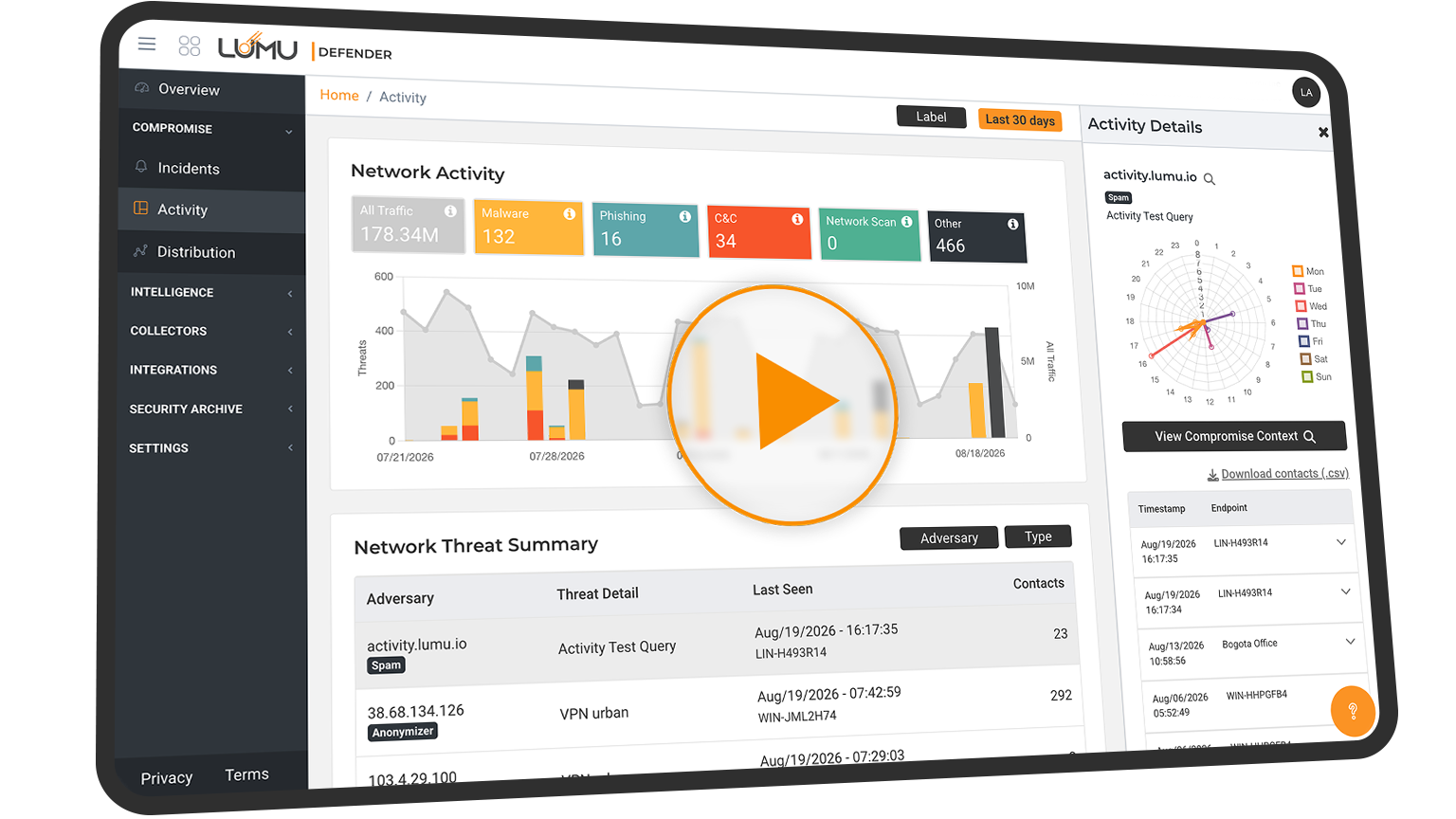

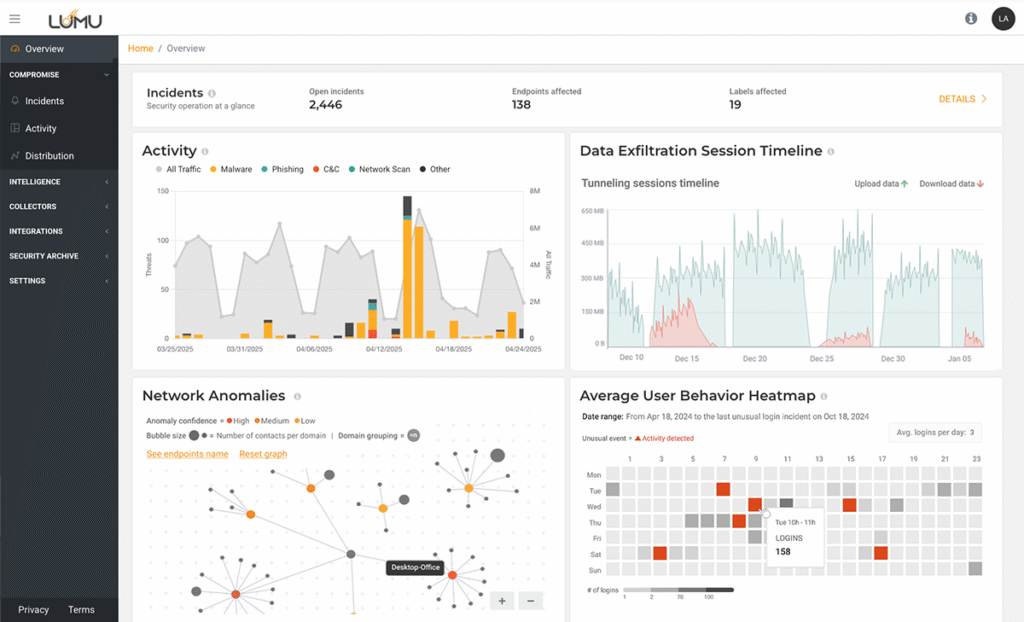
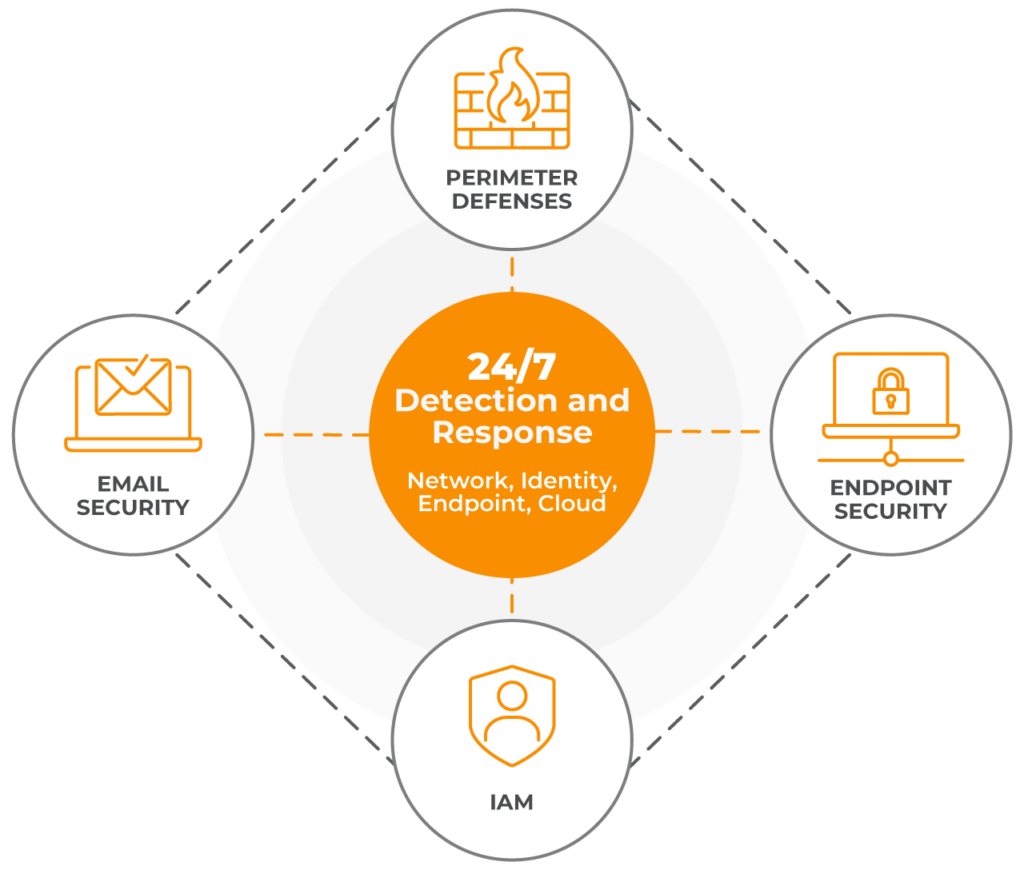




24/7 continuous analysis of activity across networks, endpoints, identities, and the cloud to confirm malicious activity.
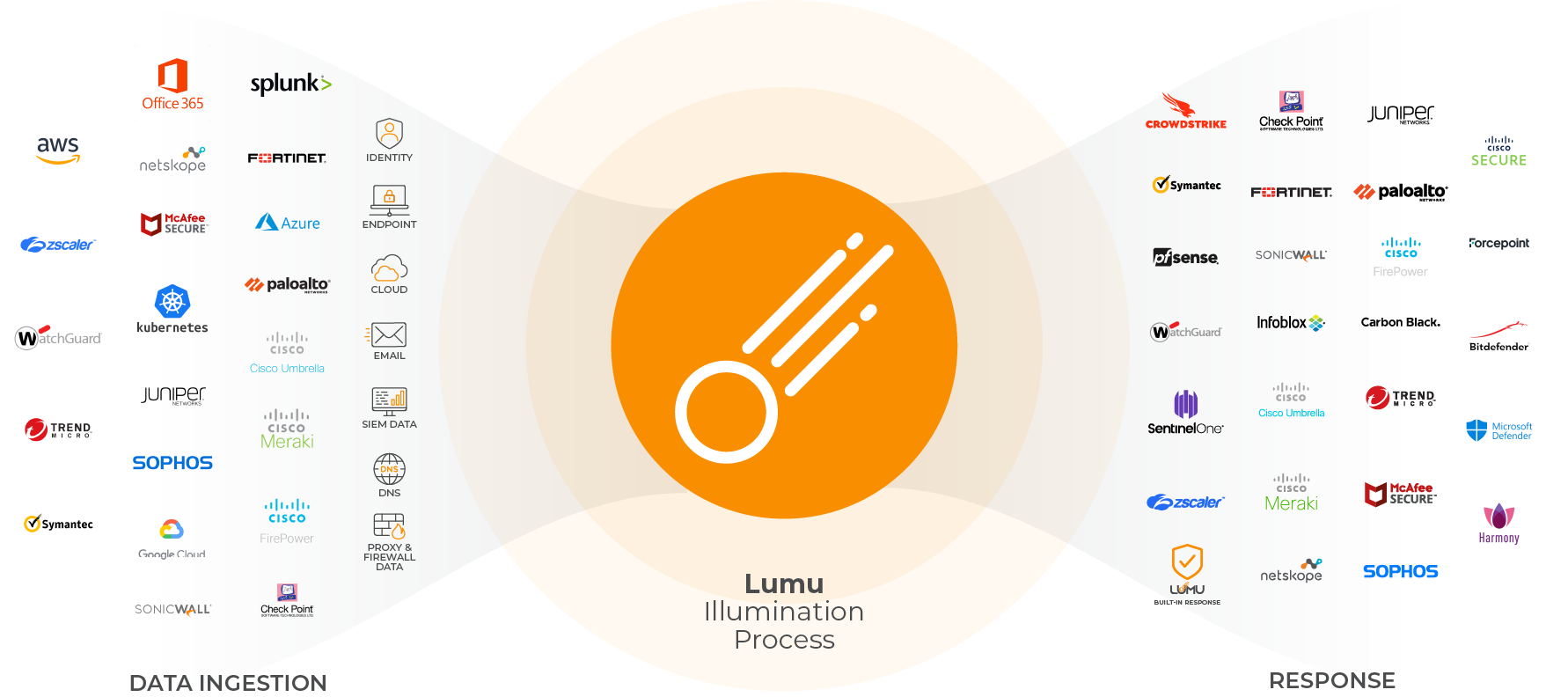
Real-time threat response with over 180+ integrations or via the Lumu Agent with built-in response.

Identify AI-powered attacks and adversaries using legitimate tools that often bypass traditional perimeter and endpoint controls.
Unlike traditional NDR solutions, Lumu provides two years of network metadata storage and retrospective analysis to identify previous compromise based on new IOCs
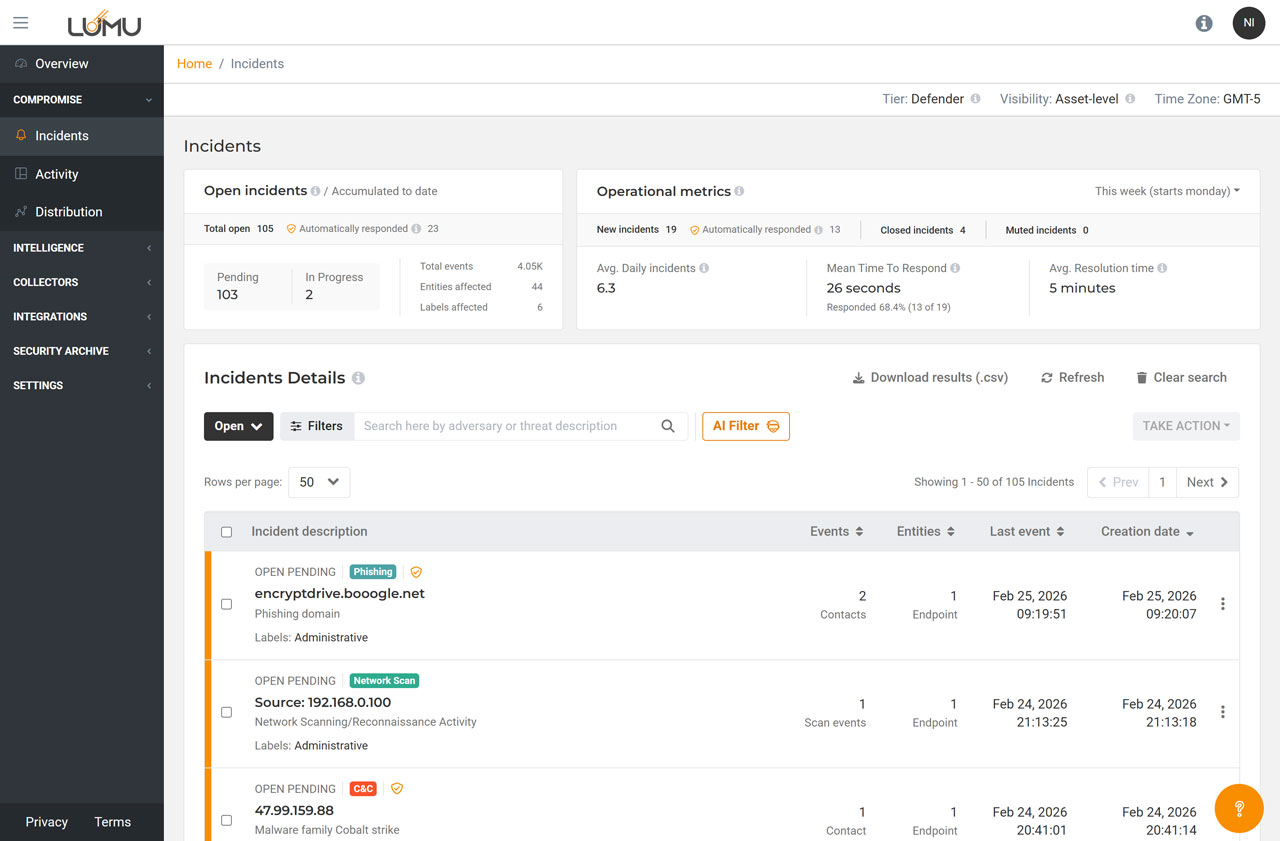
See which incidents are currently open, pending, or in progress.
Number of incidents closed within the selected timeframe below.
Average # of incidents created on a daily basis.
Allows you to select preferred time.
Visualize incidents by their status -open, muted, closed, or all.
Filter incidents based on threat type, labels, contacts and more.
Search for incidents using keywords.
Download incident information based on filters applied.
Take group actions on incidents like closing, muting, or mark pending.
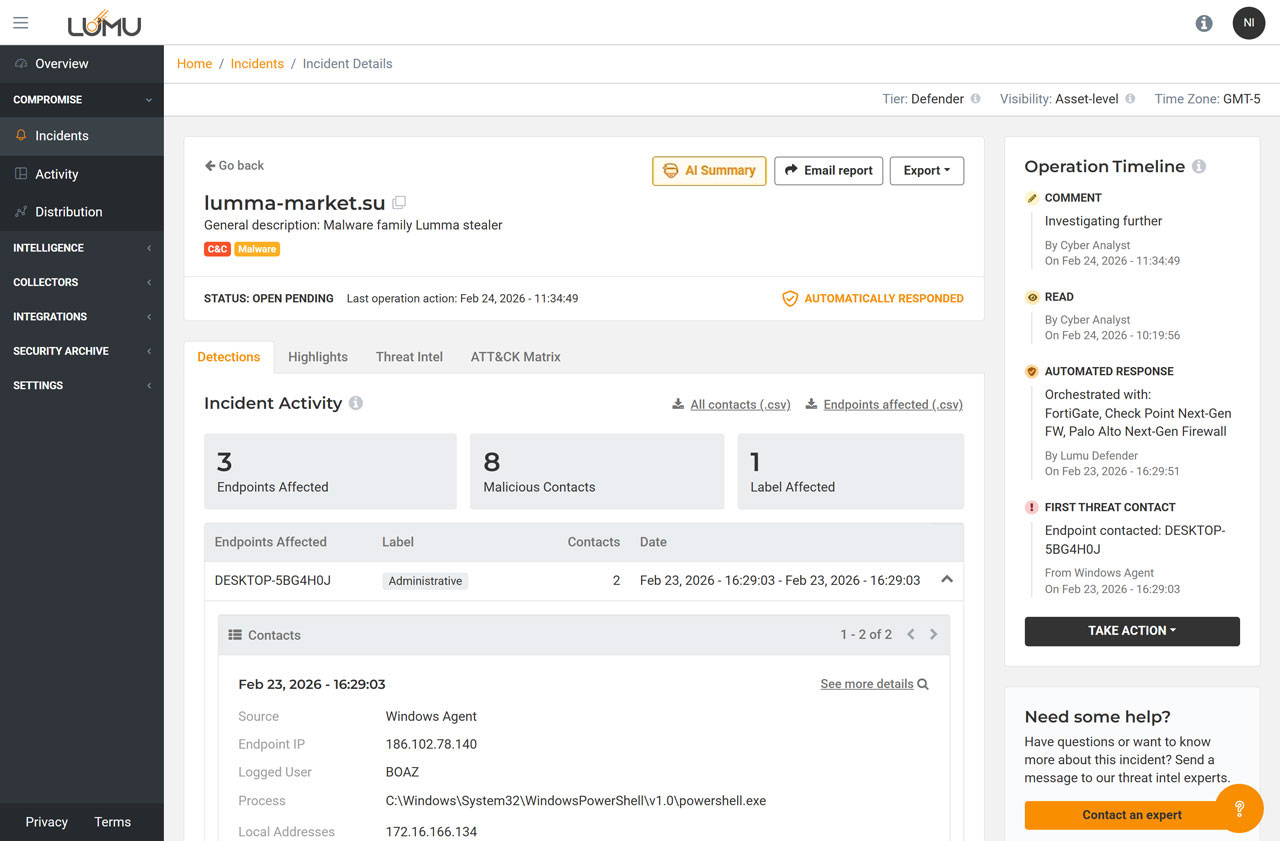
See the name of the IoC and a description of the threat.
Get the context around how your organization is being impacted by adversaries.
See exactly which endpoints have been impacted and how.
Shows how you and your team have responded to the incident.
Take actions within the incident and collaborate as a team.
Additional information from the collector about the threat and the impacted asset.
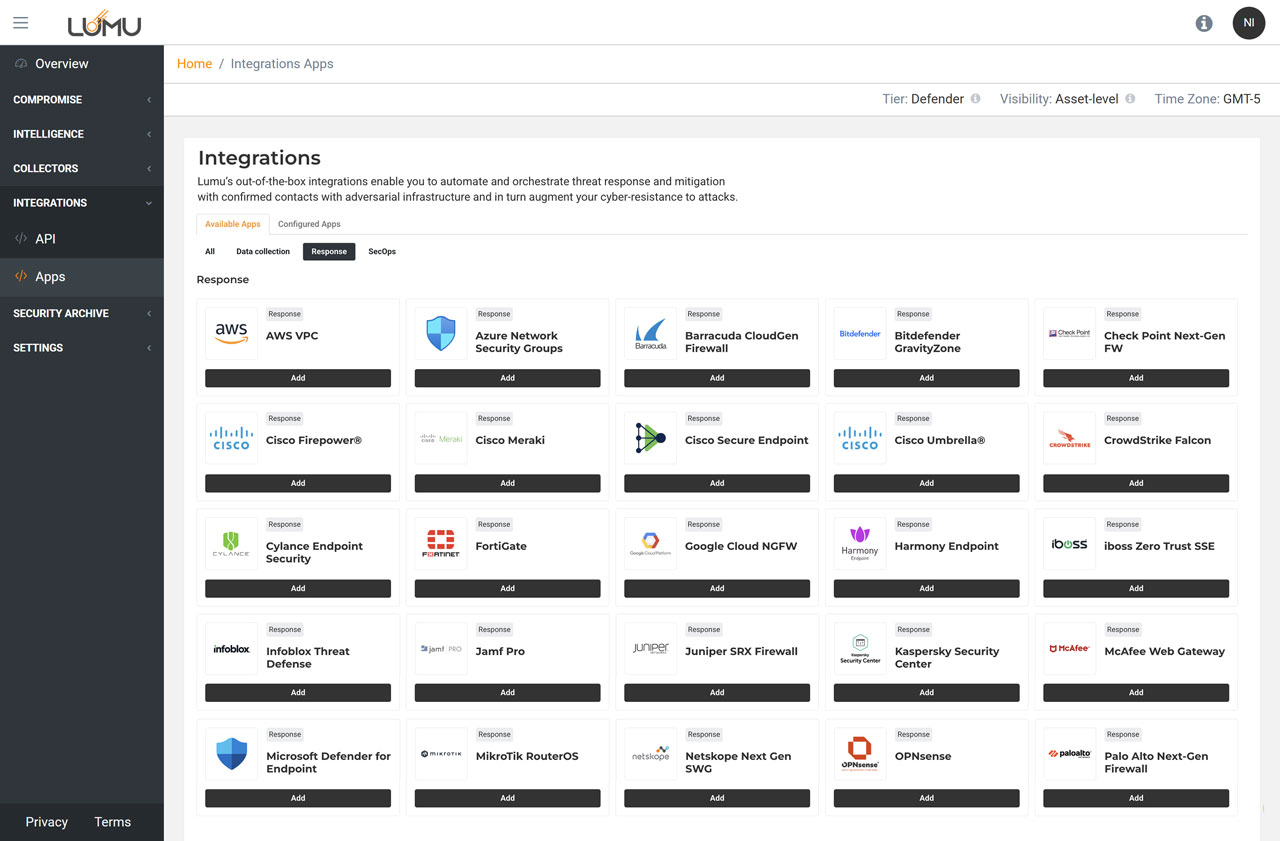
Configure integrations with Lumu’s API
Designate actions against threats with just a few clicks using out-of-the-box integrations.
Click on add to begin configuring your integration with just a few clicks.
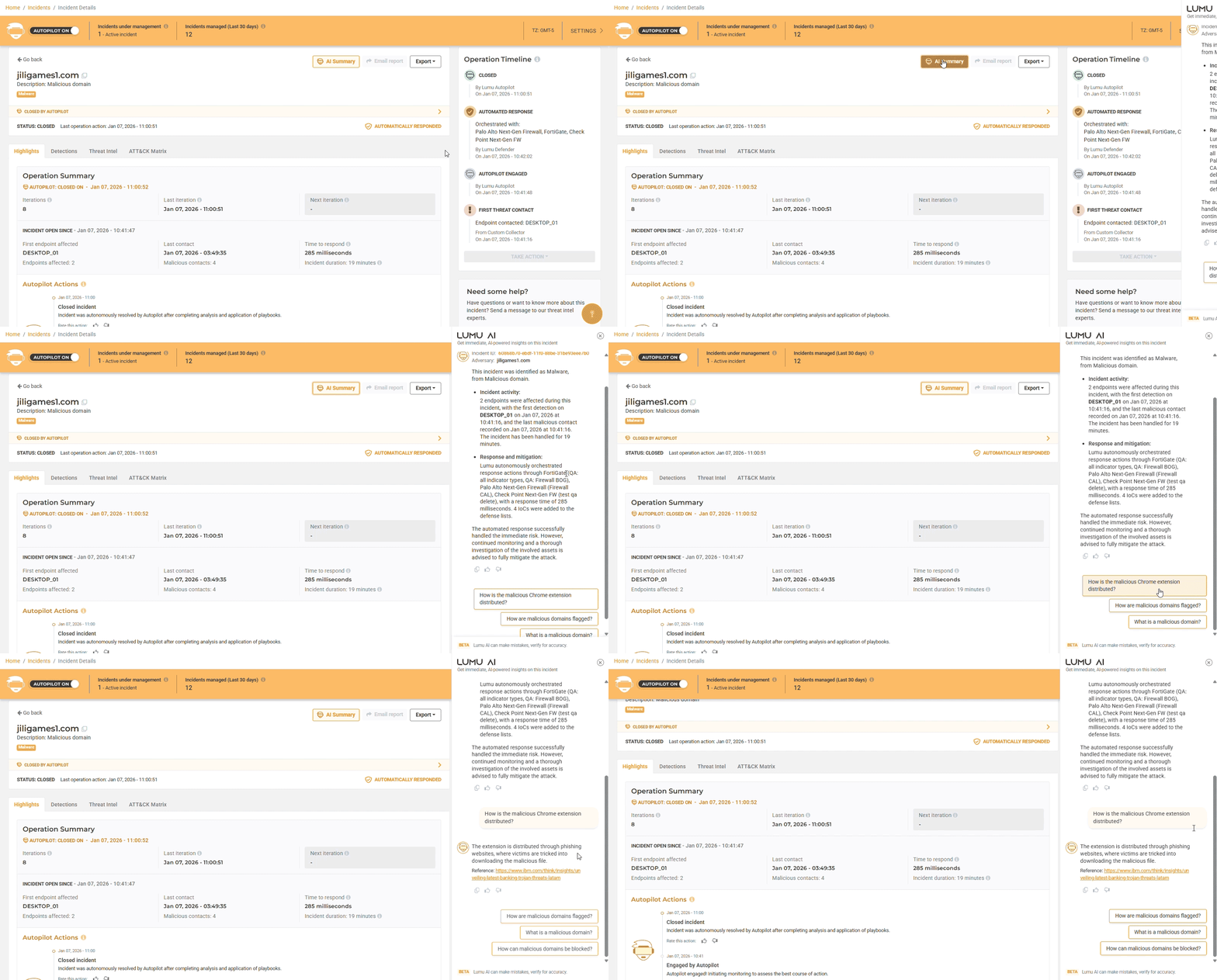
See actions taken by Autopilot and team members.
Understand why each action was taken.
Get a clear summary
of incidents.

EDUCATION

Director of Technology
“Working with the engineers from Lumu was incredibly helpful and easy. We deployed the app to all of our Chromebooks, through our Google workspace”
Watch Interview
EDUCATION

Information Systems Director
“Think of a security stack as a stack of Swiss cheese pieces: each piece provides defense, but each one of those layers has holes in it. If a threat gets through, Lumu catches that.”
Watch InterviewEDUCATION

IT Director
“Lumu gives us faster detection and less guesswork. We are not cybersecurity experts so we need something like Lumu to partner with us and do the things that we can't.”
Watch Interview
EDUCATION

Technology and Facilities Director
“It paired really nicely with our Checkpoint firewall and our CrowdStrike. That interoperability oftentimes doesn’t happen. And so Lumu really makes these other tools that we were using better.”
Watch InterviewEDUCATION

Systems Administration Manager
“The Lumu dashboard provides visibility into all of the different traffic coming from those integrated parts and pieces, so that you don’t have to spend time opening different locations.”
Watch Interview
EDUCATION

Director of information Services
“Even though we had our security stack in place, those solutions had some gaps. [When we installed Lumu we were seeing some command and control and malware on the servers.”
Watch InterviewEDUCATION

Director of Technology
“The ability to see into what our 10,000 Chromebooks are doing is important. The agent provided by Lumu gives us that ability.”
Watch Interview
CONSTRUCTION

Security Engineer
"Lumu is that guy that's up 24 hours looking at the threats, looking at the data, and if action is necessary, they raise the alert, hook into your integrations, and do it all for you."
Watch Interview
BANKING

SVP, Senior Technology Officer
“Lumu catches the things that make it past our other defences. It’s kind of scary – if we didn’t have Lumu, what would we not be seeing?”
Watch Interview
FINANCIAL

Head of Cybersecurity
"Lumu identifies what is failing, against whom you are failing, and how to respond to that failure. Nothing else in the market does this."
Watch Interview
FINANCIAL

CISO
"Lumu can even see things before my endpoint protection. This is spectacular because I don’t need to activate an endpoint response plan, because I’ve dealt with it before it’s happened."
Watch Interview
FINANCIAL

Cybersecurity Manager
"Lumu gives you all the information you need to precisely act in a timely manner"
Watch Interview
STATE & LOCAL GOVERNMENT

Chief Information Officer
“Lumu is making actionable decisions in real-time based on information it’s ingesting from our network, it integrates with our firewall and response happens within seconds.”
Watch Interview
STATE & LOCAL GOVERNMENT

Information Security Officer
"Lumu’s automated response is next generational, we’re not up all night watching monitors to see what’s going on."
Watch Interview
HEALTHCARE

IT Coordinator
“It gives me those tools that I need to be able to protect my patient information in a way that HIPAA is satisfied with and of course if HIPAA is satisfied with it then I'm satisfied with it.”
Watch Interview
MSP

Cloud / Security Specialist
"Lumu has been fantastic in it’s flexibility around deployment for different customers.”
Watch Interview
MSP

CEO
“When Lumu sees compromise it will integrate with your other products to automatically block those threats.”
Watch InterviewMSP

Systems Engineer
“Lumu helped us narrow down response efforts to a malicious incident with a client by showing us what happened, seeing which user it involved, the specific IP and device so we could quickly reach out to our client and let them know what was going on.“
Watch Interview
MSP

IT Consultant
“Lumu helps us understand which tools we need in our cyber-stack and whether or not they are actually working.”
Watch Interview
GOVERNMENT

Network Security Analyst
“We previously used a SIEM that complicated things, Lumu gives us clear information we can decisively act on.“
Watch Interview
HEALTHCARE

Director, Information Technology
“We installed Lumu and within two months we were able to detect a serious threat, the quick turnaround from Lumu to notify us allowed us to close up that threat as quickly as possible and stop a possible bad breach to our Network.”
Watch Interview
HOSPITALITY

IT Director
"Lumu is easy to install. Since we don't have a full time cybersecurity person on staff, Lumu has become our virtual cybersecurity analyst.”
Watch InterviewEDUCATION
Director of Technology
“Working with the engineers from Lumu was incredibly helpful and easy. We deployed the app to all of our Chromebooks, through our Google workspace”
Watch InterviewEDUCATION
Information Systems Director
“Think of a security stack as a stack of Swiss cheese pieces: each piece provides defense, but each one of those layers has holes in it. If a threat gets through, Lumu catches that.”
Watch InterviewEDUCATION
IT Director
“Lumu gives us faster detection and less guesswork. We are not cybersecurity experts so we need something like Lumu to partner with us and do the things that we can't.”
Watch InterviewEDUCATION
Technology and Facilities Director
“It paired really nicely with our Checkpoint firewall and our CrowdStrike. That interoperability oftentimes doesn’t happen. And so Lumu really makes these other tools that we were using better.”
Watch InterviewEDUCATION
Systems Administration Manager
“The Lumu dashboard provides visibility into all of the different traffic coming from those integrated parts and pieces, so that you don’t have to spend time opening different locations.”
Watch InterviewEDUCATION
Director of information Services
“Even though we had our security stack in place, those solutions had some gaps. [When we installed Lumu we were seeing some command and control and malware on the servers.”
Watch InterviewEDUCATION
Director of Technology
“The ability to see into what our 10,000 Chromebooks are doing is important. The agent provided by Lumu gives us that ability.”
Watch InterviewCONSTRUCTION
Security Engineer
"Lumu is that guy that's up 24 hours looking at the threats, looking at the data, and if action is necessary, they raise the alert, hook into your integrations, and do it all for you."
Watch InterviewBANKING
SVP, Senior Technology Officer
“Lumu catches the things that make it past our other defences. It’s kind of scary – if we didn’t have Lumu, what would we not be seeing?”
Watch InterviewFINANCIAL
Head of Cybersecurity
"Lumu identifies what is failing, against whom you are failing, and how to respond to that failure. Nothing else in the market does this."
Watch InterviewFINANCIAL
CISO
"Lumu can even see things before my endpoint protection. This is spectacular because I don’t need to activate an endpoint response plan, because I’ve dealt with it before it’s happened."
Watch InterviewFINANCIAL
Cybersecurity Manager
"Lumu gives you all the information you need to precisely act in a timely manner"
Watch InterviewSTATE & LOCAL GOVERNMENT
Chief Information Officer
“Lumu is making actionable decisions in real-time based on information it’s ingesting from our network, it integrates with our firewall and response happens within seconds.”
Watch InterviewSTATE & LOCAL GOVERNMENT
Information Security Officer
"Lumu’s automated response is next generational, we’re not up all night watching monitors to see what’s going on."
Watch InterviewHEALTHCARE
IT Coordinator
“It gives me those tools that I need to be able to protect my patient information in a way that HIPAA is satisfied with and of course if HIPAA is satisfied with it then I'm satisfied with it.”
Watch InterviewMSP
Cloud / Security Specialist
"Lumu has been fantastic in it’s flexibility around deployment for different customers.”
Watch InterviewMSP
CEO
“When Lumu sees compromise it will integrate with your other products to automatically block those threats.”
Watch InterviewMSP
Systems Engineer
“Lumu helped us narrow down response efforts to a malicious incident with a client by showing us what happened, seeing which user it involved, the specific IP and device so we could quickly reach out to our client and let them know what was going on.“
Watch InterviewMSP
IT Consultant
“Lumu helps us understand which tools we need in our cyber-stack and whether or not they are actually working.”
Watch InterviewGOVERNMENT
Network Security Analyst
“We previously used a SIEM that complicated things, Lumu gives us clear information we can decisively act on.“
Watch InterviewHEALTHCARE
Director, Information Technology
“We installed Lumu and within two months we were able to detect a serious threat, the quick turnaround from Lumu to notify us allowed us to close up that threat as quickly as possible and stop a possible bad breach to our Network.”
Watch InterviewHOSPITALITY
IT Director
"Lumu is easy to install. Since we don't have a full time cybersecurity person on staff, Lumu has become our virtual cybersecurity analyst.”
Watch InterviewEDUCATION
Director of Technology
“Working with the engineers from Lumu was incredibly helpful and easy. We deployed the app to all of our Chromebooks, through our Google workspace”
Watch InterviewEDUCATION
Information Systems Director
“Think of a security stack as a stack of Swiss cheese pieces: each piece provides defense, but each one of those layers has holes in it. If a threat gets through, Lumu catches that.”
Watch Interview